

Preface
I will try to show by example the visual part of the video recommendation system. When I write a visual part, it means I won’t show some complex mathematical equations and matrices full of data. This is a part of my learning process, it’s not perfect. As I wrote in my previous article How did my journey with AI & ML start? “During some coding session, a friend showed me on a piece of paper how movie recommendation systems work using matrices. I’ve asked him, is it really that simple? It was the starting point.”.
Video recommendation – visual part – all users
The below chart shows people’s likes based on the movie’s duration. Zero means “Dislike”, and one means “Like”. We can clearly see that there is a group of people who “Dislike” movies shorter than 35 minutes, and another group of people who “Like” movies regardless of the duration time. But where is Wally/Waldo, oh, I mean Fin, a person called Fin? Let’s filter the data only for Fin’s preferences.

Video recommendation – visual part – user called Fin
On the next chart, we can see that Fin likes long movies, more than 70 minutes in length, and dislikes the ones shorter than 30 minutes in length. This kind of data can be used for Fin’s movie recommendation. I know that this is a huge simplification, but wanting to keep my promise of not writing complex mathematical equations I had to make such a simplification.
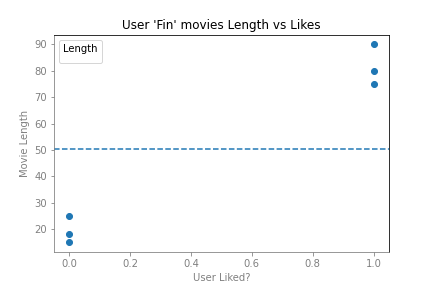
In creating a movie recommendation system, Machine Learning algorithms may use this data to make predictions for movies that people want to see. Fin will get long and top-rated movie recommendations.
Video recommendation – the data and the tool
The above shows the visual part without complex mathematical equations and matrices full of data. Below I will show some raw data and methods used for creating these plots/charts.
The data – simple CSV file
| User | Video | Liked? | Length |
|---|---|---|---|
| Iris | Lions HD | 0 | 25 |
| Fin | Small Village | 1 | 80 |
| Max | Out of Control | 1 | 30 |
| Fin | Lullaby | 0 | 15 |
| … | … | … | … |
The tool – Jupyter Notebook
Unfortunately, I’m not able to attach the Jupyter Notebook file (ipynb) because WordPress blocks that kind of file. I have to paste code snippets.
import pandas as pd
import numpy as np
import matplotlib.pyplot as plt

video_recommend = pd.read_csv("Video-recommendation-engine_data.csv")
video_recommend_fin = video_recommend[video_recommend["User"] == "Fin"]
The above code loads the data from the CSV file.
import pandas as pd
import numpy as np
import matplotlib.pyplot as plt
%matplotlib inline

video_recommend = pd.read_csv("Video-recommendation-engine_data.csv")
video_recommend_fin = video_recommend[video_recommend["User"] == "Fin"]
video_recommend_fin.plot(x="Liked?", y="Length", kind="scatter");
The above code shows the simplest way to create a plot/chart based on the data from the CSV file.
fig_all, ax_all = plt.subplots()
scatter = ax_all.scatter(x=video_recommend["Liked?"],
                    y=video_recommend["Length"],
                    cmap="summer")

ax_all.set(title="All users movies Length vs Likes",
      xlabel="User Liked?",
      ylabel="Movie Length")

ax_all.axhline(video_recommend_fin["Length"].mean(), linestyle="--")
ax_all.legend(*scatter.legend_elements(), title="Length")

fig_all.savefig("user-all-movies-likes-plot");
The above code shows how to create a plot/chart for “All users movies Length vs Likes” – the object-oriented way of using matplotlib.
fig_length_fin, ax_length_fin = plt.subplots()
scatter = ax_length_fin.scatter(x=video_recommend_fin["Liked?"],
                    y=video_recommend_fin["Length"],
                    cmap="summer")

ax_length_fin.set(title="User 'Fin' movies Length vs Likes",
      xlabel="User Liked?",
      ylabel="Movie Length")

ax_length_fin.axhline(video_recommend_fin["Length"].mean(), linestyle="--")
ax_length_fin.legend(*scatter.legend_elements(), title="Length")

fig_length_fin.savefig("user-Fin-movies-length-plot");
The above code shows how to create a plot/chart for “User ‘Fin’ movies Length vs Likes” – the object-oriented way of using matplotlib.
NOTE: In this article, I’m just barely scratching the surface. This topic needs more reading and research on your own. As a good starting point, readers may check a few useful resources in my other article – How did my journey with AI & ML start?. I’m still at the beginning of my learning process with AI & ML!


Leave a Reply